






Why Route Density Is the Hidden Profit Lever in Your Cleaning Business
When I first started my cleaning business, I said yes to everyone. Downtown apartments. Far-out suburbs. One-time jobs 45 minutes away. I thought more bookings = more income.
I was wrong.
What I didn’t realize was that profit per hour matters far more than total revenue. And the biggest thing draining that profit? Low route density.
Once I figured out how to cluster clients by location and day, my fuel costs dropped, my time freed up, and my hourly income increased — without adding more jobs.
Here are 7 strategies I used (and still use) to build tighter schedules, boost route density, and make every hour count.
1. Audit Your Current Routes Weekly
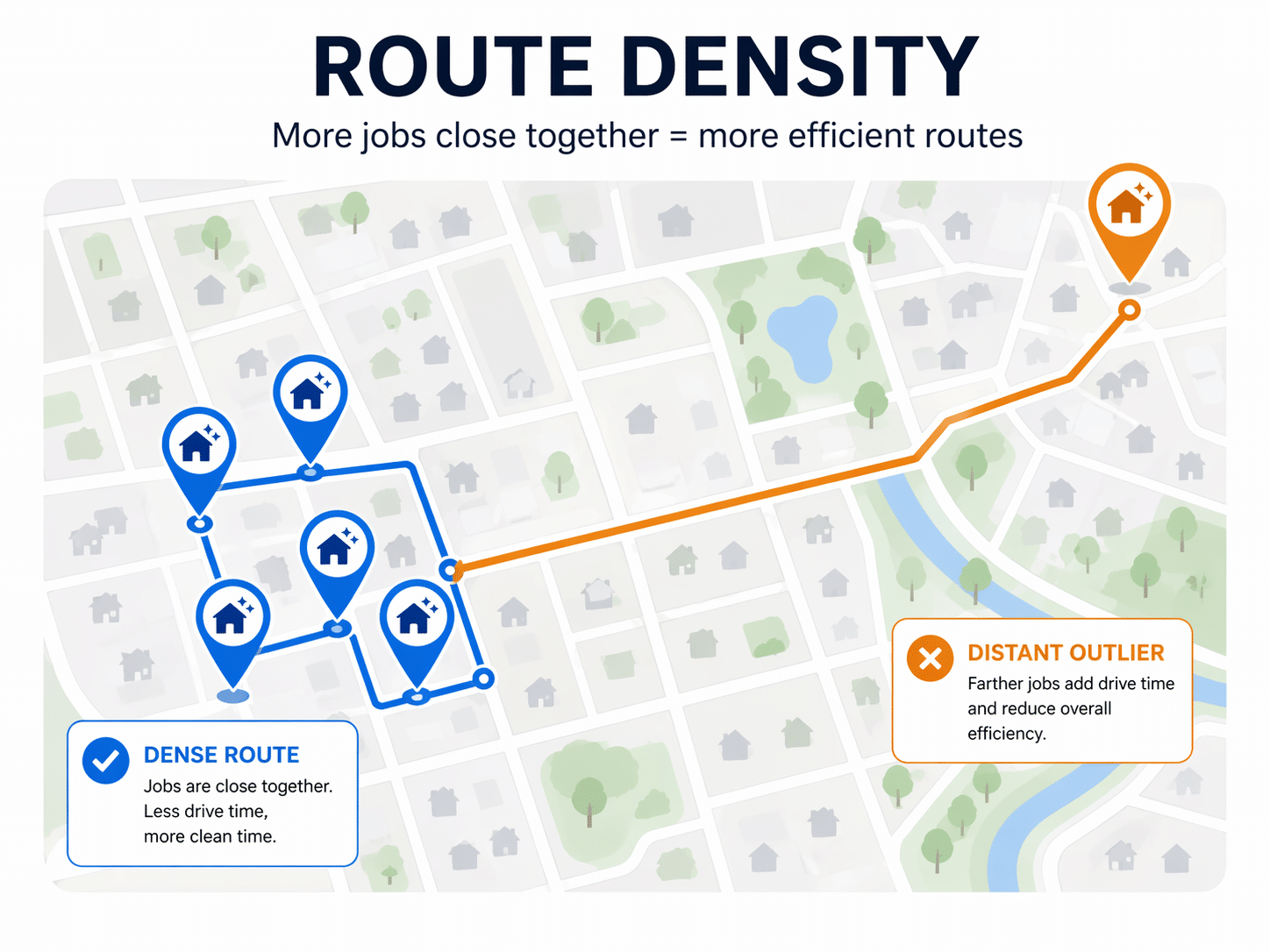
Start by tracking where your jobs are each week. Plot them on a Google Map or use a CRM like Jobber to view client locations.
Look for:
- Gaps between jobs
- Long drive times
- Odd jobs that pull you away from dense zones
🧠 Tip: Time yourself between locations. You might think it’s “just 20 minutes” but that adds up to hours weekly.
Action:
- Identify outlier jobs (far from your core area)
- Decide: Raise their rate or replace with closer clients
Case Example: I used to clean a single apartment 30 minutes away on Thursdays. After adding two clients nearby, that route became my most profitable day.
2. Designate Neighborhood Days
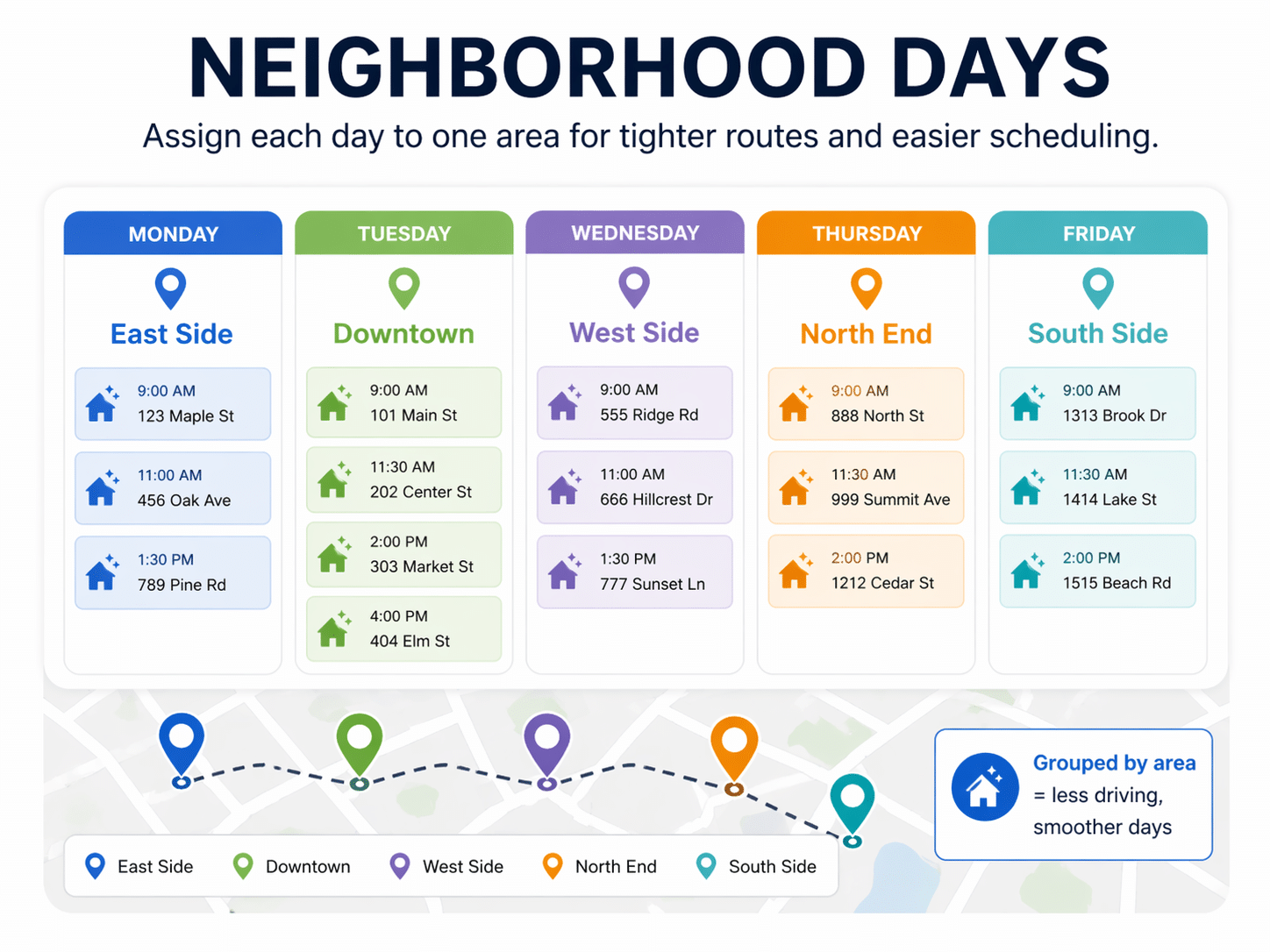
Want to stop zig-zagging across town every day? Assign specific days to specific areas.
Example:
- Monday: East Side
- Tuesday: Downtown
- Wednesday: West Side
This instantly improves route efficiency and sets client expectations.
Bonus:
This also makes reschedules easier — you only offer spots on the same area’s day.
Tool Tip: Use Google Calendar color-coding to map zones visually.
3. Set a Minimum Hourly Rate (Including Drive Time)
You don’t get paid for time on the road. So if you spend 40 minutes driving to a 1-hour job, you’re not making what you think.
Solution:
Calculate your profit per hour including drive time.
If a job takes 60 mins and 30 mins to get to, your hourly pay is cut by 33%.
Set a minimum. Example:
- “$60/hr minimum including drive time”
- If it doesn’t hit that, either:
- Decline it
- Add a distance fee
- Offer alternative scheduling
Message Template:
“We’d love to help, but that location falls outside our route. We have availability for [Zip Code] clients on Wednesdays. Would you like to join our waitlist or consider that schedule?”
4. Offer Discounts for Specific Time Slots or Areas
Incentivize clients to help you build better routes.
Example:
- “$10 off if you book Tuesdays in [Area Name]”
- “Bundle cleanings with your neighbors and save $20 each!”
People love a deal, and you get to work more efficiently.
📈 Stat: Businesses with optimized routes save 20-30% in fuel and 15-25% in labor time (Source: Verizon Connect).
Pro Tip: Put this offer in your email footer or client portal. It passively nudges behavior.
5. Create Waitlists by Zip Code
If a lead calls from a location that doesn’t fit your current route, don’t say “no.”
Say: “I’ll add you to our waitlist for [Zip Code]. Once we have a few more clients in that area, we’ll open a route.”
This way:
- You control your schedule
- You build density intentionally
- You don’t burn gas chasing one-off jobs
Bonus Tip: Keep a Google Sheet labeled “Waitlist by Zip” — revisit it weekly when planning.
6. Batch One-Time Jobs by Area and Date
Move-out cleans, post-construction, and deep cleans can wreck your schedule if scattered.
Instead:
- Only offer them on certain days
- Group them by zip code
- Pre-screen for size and drive time
Example:
- “We do move-outs in 78260 zip on Thursdays only.”
This keeps your week smooth and prevents the burnout of long, unprofitable days.
Email Template:
“We’ve reserved Thursdays for deep cleans in your area. Let us know if you’d like to book into our next available Thursday opening.”
7. Say No to Bad-Fit Jobs
This was hard when I was new. But saying yes to every request stretched me thin, killed my schedule, and led to burnout.
You don’t need to be mean. Try:
- “We’re fully booked in that area. Want me to waitlist you?”
- “We only service [Neighborhood] on Wednesdays. Could that work?”
Protect your time, your fuel, and your sanity.
Tools to Help You Build Route Density
| Tool | Use | Solo-Friendly? |
| Google My Maps | Plot clients by location | ✅ |
| Jobber | Smart scheduling & route optimization | ✅ |
| Notion | Weekly waitlist and routing tracker | ✅ |
| Google Sheets | Simple zip code tracking | ✅ |
| MapQuest Route Planner | Manual multi-stop optimization | ✅ |
My Weekly Routing Workflow (That You Can Steal)
Every Friday, I:
- Review next week’s jobs by zip code
- Group them into clusters by day
- Fill in gaps with clients from the waitlist
- Text clients who need to reschedule with only day options that match my route
Downloadable Template Available: Want my routing spreadsheet template? Let me know and I’ll send you a copy.
It takes 20 minutes, but saves me 5+ hours weekly.
FAQ: Route Density Questions From Cleaners Like Us
What if I only have 1 client in a zone?
Put them on a waitlist or raise the rate to reflect the time/cost.
How many jobs per day should I aim for?
4-6 is ideal, assuming minimal drive time between each.
How do I explain route-based scheduling to clients?
Say: “We group clients by zone to ensure on-time arrivals and efficiency. You’ll always get the same day and window.”
What if a great lead comes in from far away?
Check if others from that area are on your waitlist. If you can cluster 3+ jobs, it might be worth building a new route.
Final Thoughts: Fewer Miles, More Money
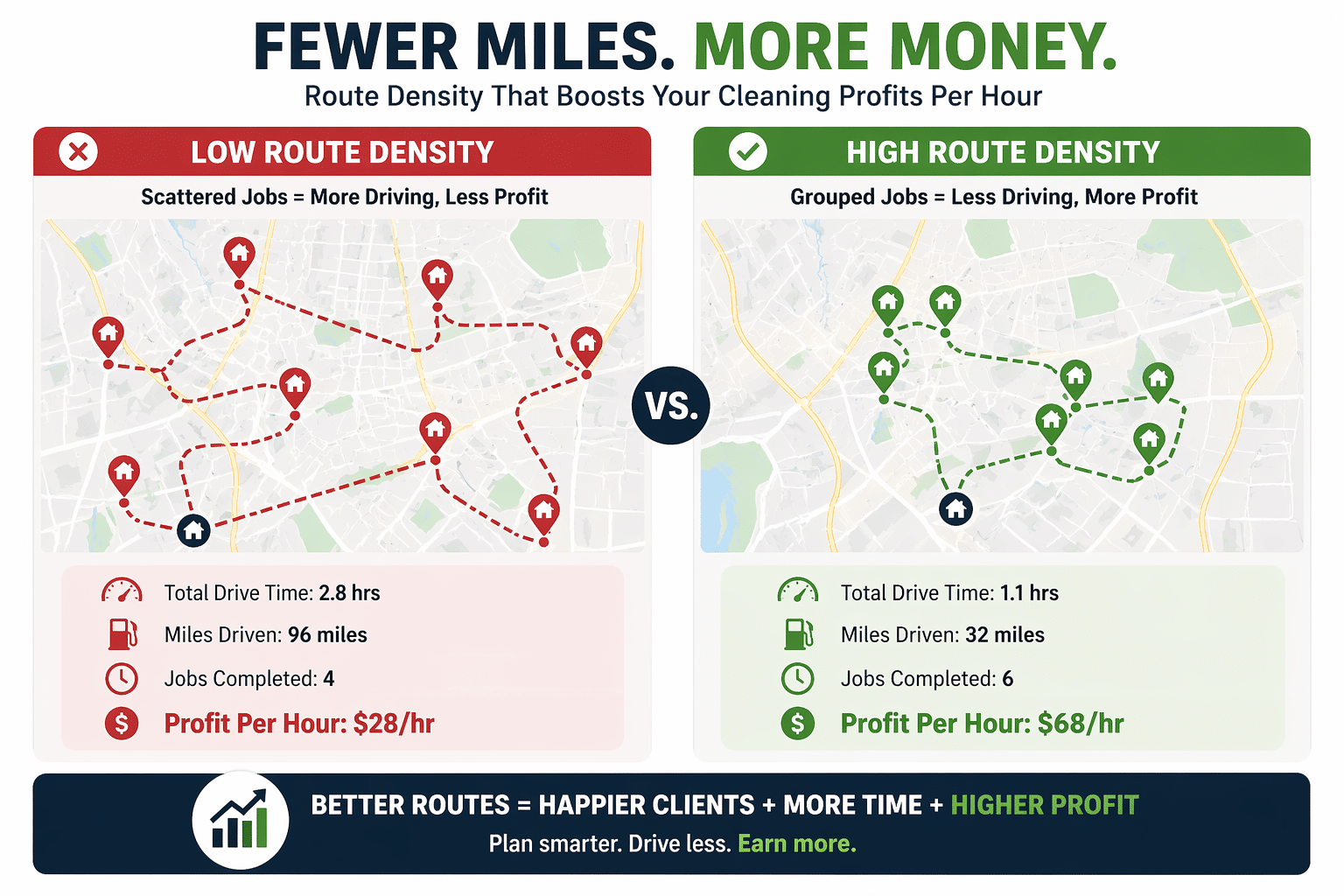
Route density changed my business. I used to brag about “fully booked days” but my bank account didn’t reflect the effort. Now, I care about profit per hour more than job count.
Tight routes = more money, less driving, and better customer experience.
Start small. Even clustering just 2 or 3 jobs per day makes a massive difference.
