






I used to think I had a lead problem.
What I actually had was a tracking problem.
An inquiry would come in through Facebook. Another would hit the website form. Someone else would text for a quote. A past customer would email asking for service again. I would answer some right away, flag a few for later, and assume I would circle back to the rest.
That worked until it did not.
A few leads went cold. A couple slipped through the cracks completely. One person followed up with, “Just checking if you’re still taking new clients?” That message stung because the truth was simple. They were ready. I was disorganized.
That is the part a lot of cleaning business owners do not say out loud. Losing leads is rarely about demand. It is usually about broken follow-up, scattered messages, and no clear system for seeing what came in, who replied, and what still needs action.
This gets expensive fast. HubSpot’s 2026 sales statistics roundup says 80% of successful sales take five or more follow-ups, while 44% of salespeople give up after one follow-up and 48% never follow up at all. That is not just a sales-team problem. It shows what happens when there is no repeatable system for tracking outreach.
For cleaning businesses, the risk is even higher because inquiries come from everywhere. Calls, text messages, Google Business Profile, referral messages, DMs, website forms, Thumbtack, Bark, email, and old customers coming back after months away. If you do not have one place to track them, you will miss some. Not because you do not care, but because your week is full.
The fix is not complicated. You do not need a giant CRM on day one. You need a simple lead tracker that shows three things clearly:
- who contacted you
- what stage they are in
- what needs to happen next
That is it.
Once you have that, follow-up improves, response times tighten, and fewer inquiries disappear into your inbox history.
Why cleaning businesses lose leads in the first place
Most lost leads do not vanish in dramatic ways. They disappear quietly.
A prospect sends a message while you are cleaning. You read it but do not answer yet. Later, it gets buried. Someone fills out a website form, but the email alert lands under five other notifications. A referral texts you after hours, and you tell yourself you will respond in the morning. Then the day starts with payroll, callouts, supplies, and a schedule change.
By the time you remember, the lead has already contacted someone else.
This is why lead tracking matters more than most owners realize. Salesforce’s small-business CRM guidance defines CRM as a system for storing and managing customer information, tracking leads, and following the conversion process in one place. That matters because scattered information creates delay, and delay kills momentum.
In a cleaning business, most leads are not comparing ten proposals over a three-month sales cycle. They want to know:
- do you service their area
- what type of cleaning you offer
- how soon you can come
- roughly what it costs
- whether you seem reliable
That means speed and consistency matter.
A lead tracker gives you both.
What a simple lead tracker actually does
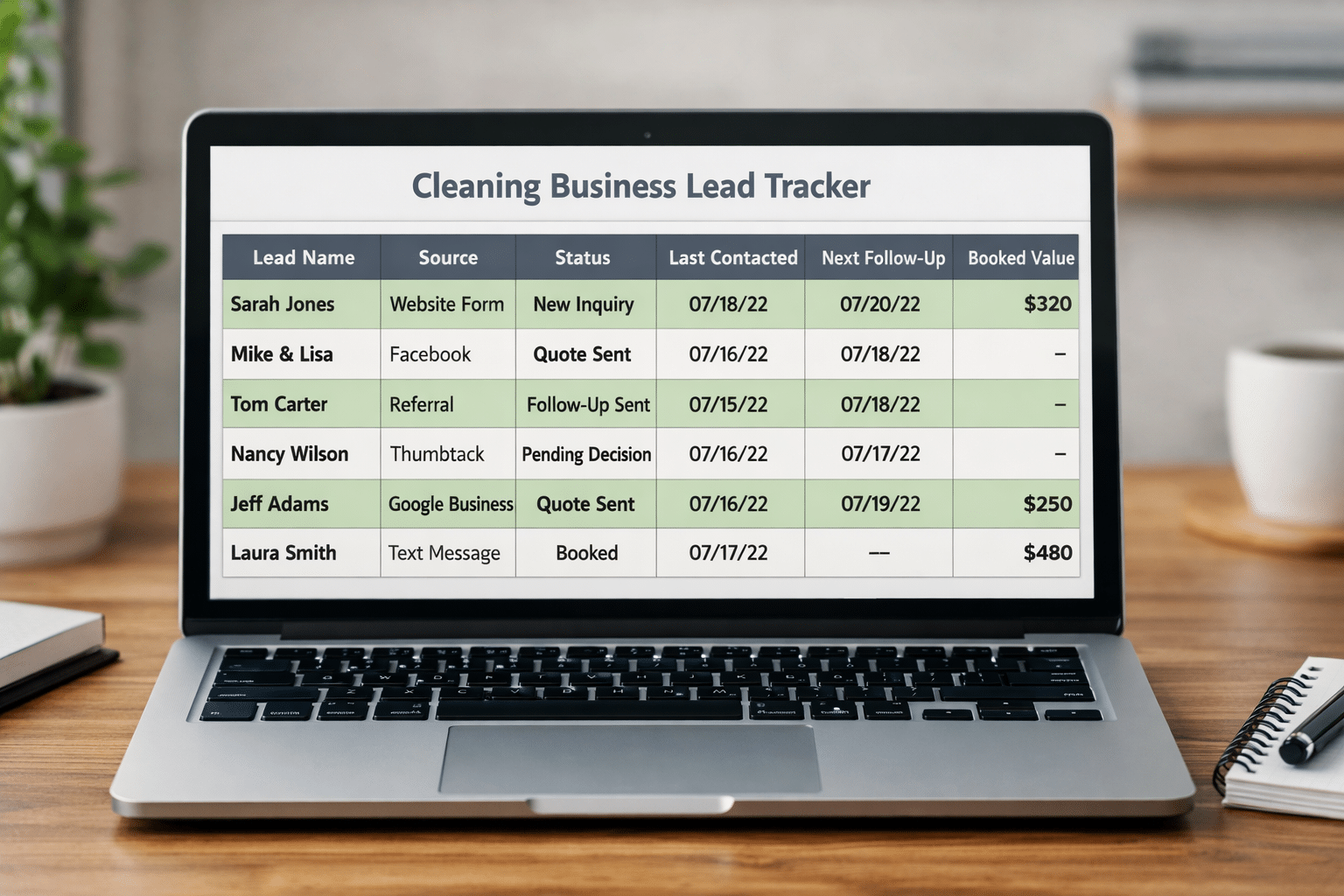
A lead tracker is not fancy. It is just one place where every inquiry gets logged and moved through a clear process.
You can build it in Google Sheets, Airtable, or a CRM. For most solo owners and small teams, Google Sheets is enough to start. Google promotes Sheets as a tool for creating trackers, tables, and organized workflows quickly, and Google Forms can feed information into a spreadsheet if you want to capture website inquiries in a structured way.
The goal is not to create a perfect dashboard. The goal is to stop relying on memory.
A good lead tracker helps you answer these questions in under a minute:
- How many new inquiries came in this week?
- Which ones have not been answered yet?
- Who got a quote but has not booked?
- Which leads went cold and need one more follow-up?
- Where are your best leads coming from?
- How many inquiries actually turned into paying clients?
If you cannot answer those questions quickly, your tracker is either missing or too messy to use.
Step 1: Pick one place to track every lead
The first rule is simple. Every lead goes in one place.
Not some in text messages, some in your email inbox, and some on a sticky note next to the laptop.
One place.
For most cleaning businesses, that can be a Google Sheet with a clean layout. If you are already using a CRM, great. Use that. But do not overcomplicate this. The tool matters less than the habit.
If you are building from scratch, a spreadsheet is enough because it is fast, flexible, and easy to update from your phone.
Your tracker should not feel like office work. It should feel like a control center.
Step 2: Track the fields that actually help you follow up
This is where people either make the tracker useful or make it annoying.
If you add too many columns, nobody updates it. If you add too few, it does not tell you what to do next.
Start with the essentials:
Core fields every cleaning lead tracker needs
- date inquiry came in
- lead name
- phone number
- service address or ZIP code
- type of cleaning needed
- source of lead
- quoted or not quoted
- current status
- last contact date
- next follow-up date
- notes
That is enough to run a real follow-up system.
You do not need twenty custom fields on day one. You need the information that helps you respond, quote, and follow through.
The two columns that matter most are current status and next follow-up date. Those are what stop leads from getting lost.
Step 3: Use clear lead stages so you always know what is happening
This is the part that changes the tracker from a list into a working system.
Every lead should sit in one status only. No vague notes like “maybe” or “check later.” You want clear stages.
Here is a simple lead-stage flow that works well for cleaning businesses:
- New inquiry
- Contacted
- Waiting for details
- Quote sent
- Follow-up due
- Booked
- Not a fit
- Lost
- Reactivation opportunity
These stages are enough for most residential and small commercial cleaning companies.
Once you assign each inquiry a stage, you stop guessing what to do with it. A “new inquiry” needs a first response. A “quote sent” lead needs a follow-up. A “reactivation opportunity” is a past lead or past customer worth contacting again.
That also helps with visibility. Salesforce notes that a CRM helps businesses track leads and conversion stages in one dashboard. Even if you are not using a full CRM yet, your spreadsheet should do that same job in a simple way.
Step 4: Add dropdowns so the tracker stays clean
This is one of the best small upgrades you can make.
Google Workspace has long recommended dropdown lists and conditional formatting in Sheets to keep spreadsheets organized and consistent. Dropdowns matter because they stop messy status names from creeping in.
Without dropdowns, one person writes:
- Quote Sent
- Sent quote
- quoted
- Estimate sent
Now your tracker is already sloppy.
With dropdowns, everyone chooses from the same list. That keeps the sheet sortable and usable.
Set dropdowns for:
- lead status
- lead source
- service type
- assigned estimator or team member
- priority level
Then color-code them so you can scan the page fast.
For example:
- red for new inquiry not answered
- yellow for follow-up due
- green for booked
- gray for lost or not a fit
That one step makes the whole tracker easier to use.
Step 5: Track the source so you know what is actually working
A lot of cleaning owners spend money on marketing without knowing which leads become real jobs.
That is a tracking problem.
Add a simple Lead Source column and keep it standardized. Use options like:
- Google Business Profile
- Website form
- Referral
- Repeat customer
- Yelp
- Thumbtack
- Bark
- Phone call
- Walk-in or local networking
This matters because once you have a few months of data, patterns get obvious.
You may discover that referrals close fast, website leads book well, and Facebook messages take more follow-up than expected. Or you may learn that one paid source brings a lot of inquiries but very few serious customers.
That is useful operational data, not just marketing data.
A simple tracker helps you spend smarter because it ties inquiries to outcomes.
Step 6: Build a follow-up rhythm into the tracker
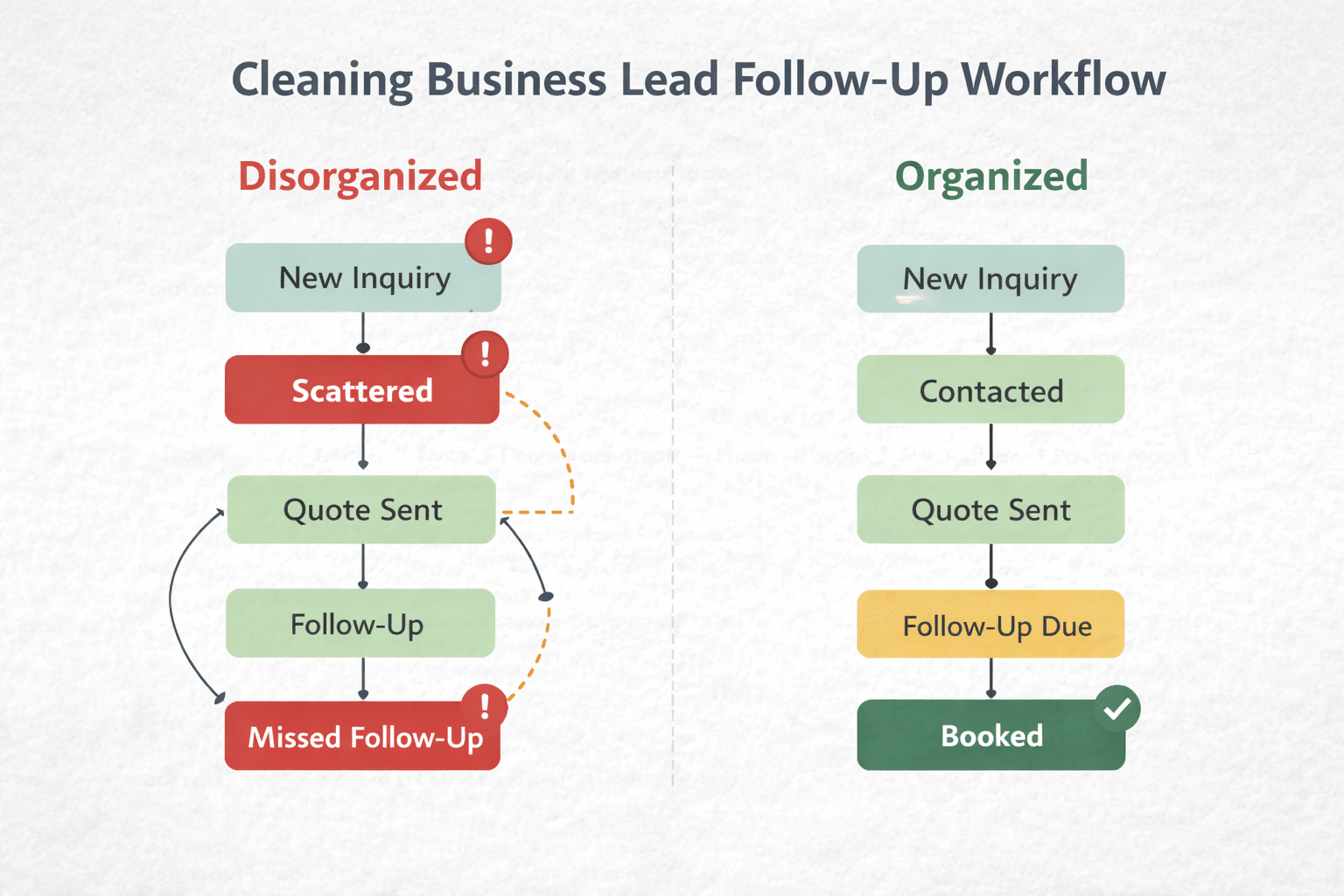
This is where most money gets left behind.
A lot of owners log leads but still lose them because the tracker shows who came in, not who needs attention today.
That is why you need a Next Follow-Up Date column and a basic rule for when follow-up happens.
A simple rhythm looks like this:
- first response the same day
- follow-up 1 within 24 hours if no reply
- follow-up 2 two days later
- follow-up 3 a few days after that
- final close-the-loop message after about a week
That structure matters because HubSpot’s current sales stats still show that repeated follow-up is closely tied to conversion, while too many people stop far too early.
For a cleaning company, follow-up does not need to feel salesy. It just needs to be clear and helpful.
Examples:
- “Wanted to make sure you got your quote.”
- “I have availability this week if you want to get on the schedule.”
- “Checking back in to see if you still need recurring service.”
- “I can hold your preferred day if you want to move forward.”
Good follow-up is service. Not pressure.
Step 7: Make the tracker easy to update from your phone

If the tracker only works when you are sitting at a desk, it will break.
Cleaning business owners live in motion. You are on jobs, in the car, checking supplies, handling team questions, and answering client messages between stops. Your lead tracker needs to work in that reality.
That means:
- mobile-friendly format
- short dropdown choices
- no clutter
- fast notes
- clear next step fields
This is another reason spreadsheets work well at first. Google Sheets and Forms are easy to access on mobile, and Forms can give you a simple intake method for assistants or team members to enter inquiries in a consistent format.
If your office manager, virtual assistant, or team lead also handles inquiries, this becomes even more important. Everyone needs to update the same system the same way.
Step 8: Review it daily and weekly so it stays alive
A tracker only works if it gets used.
That is where a lot of businesses fail. They create the sheet, feel organized for three days, then drift back into inbox chaos.
The fix is simple.
Check it twice:
Daily review
Look at:
- new inquiries
- follow-ups due today
- quotes sent but not booked
- anything sitting too long without movement
Weekly review
Look at:
- total inquiries
- total booked jobs
- lead sources
- close rate by source
- average response speed
- old leads worth reactivating
This is where the tracker starts doing more than preventing losses. It starts helping you improve decisions.
HubSpot’s 2026 workflow automation guidance specifically points to response time, follow-up completion, and conversion rates as core metrics worth monitoring when building lead systems.
That is exactly what your tracker should help you see.
Step 9: Know when to graduate from a spreadsheet to a CRM
A spreadsheet is enough until it is not.
You do not need to rush into a CRM just because somebody says “real businesses use one.” Plenty of cleaning companies can run well on a strong spreadsheet for a long time.
But there are signs it is time to level up:
- multiple people are handling leads
- follow-up is becoming too manual
- you want automated reminders or workflows
- your volume is high enough that the sheet feels crowded
- you need pipeline reporting without building formulas yourself
Salesforce describes CRM for small business as a way to manage contacts, track leads, and organize the full customer lifecycle in one place. That becomes more valuable as team size, lead volume, and service complexity grow.
The mistake is not using a spreadsheet too long. The mistake is having no system at all.
A simple tracker today beats a perfect CRM setup six months from now.
The simplest lead tracker layout to start with
If I were building one today for a cleaning business, I would start with these columns in this exact order:
- Date In
- Lead Name
- Phone
- Area
- Service Type
- Lead Source
- Status
- Quote Amount
- Last Contacted
- Next Follow-Up
- Assigned To
- Notes
- Booked Value
- Outcome
That layout gives you enough to manage the lead, follow through, and measure results.
Nothing fancy. Just useful.
What this fixes in real life
A simple lead tracker solves everyday problems that quietly hurt growth:
- missed quote requests
- slow replies
- forgotten follow-ups
- duplicate outreach
- no visibility into marketing performance
- no idea how many leads actually book
- old leads never getting revisited
It also lowers stress.
That matters more than people think.
When leads are scattered, everything feels urgent because nothing feels controlled. When the tracker is up to date, you know where things stand. That makes the business easier to run.
The real goal is not a spreadsheet. It is trust in your process.
That is what changed for me.
Once every inquiry had a place, I stopped wondering what I was forgetting. I stopped digging through texts looking for names. I stopped relying on memory for follow-up. I stopped assuming I would remember later.
And most importantly, I stopped losing good opportunities for dumb reasons.
That is what a lead tracker gives you. Not just organization. Control.
If your cleaning business is getting inquiries from more than one place, you need this.
Build the simplest version first. Use it every day. Tighten it over time. Then let the system do what memory never will.
Catch every inquiry. Follow up consistently. Book more of the work you already earned.
